WooCommerce to Zoho Inventory integration, on autopilot.
Every WooCommerce order becomes a Zoho Inventory sales order automatically, with the exact Zoho tax you choose. Paid plans also create the invoice, record the payment and mark it shipped. No copy-paste, no wrong taxes.
WooCommerce and Zoho are trademarks of their respective owners.
What is Order Sync for Zoho Inventory?
Order Sync for Zoho Inventory is a WordPress plugin by Modeverse that connects WooCommerce to Zoho Inventory. When a customer places an order, it creates the matching Zoho Inventory sales order with the customer, products, shipping charges, fees and the exact Zoho tax you mapped. The free version handles sales orders. Paid plans (from $3/month) also create the Zoho invoice, record the payment and create the package and delivered shipment.
Last updated: November 2026 · Version 1.1
- Works with
- WooCommerce + Zoho Inventory
- Also reaches
- Zoho Books, via Zoho's own sync
- Price
- Free · paid from $3/month
- Requirements
- WordPress 6.5+, WooCommerce 8.0+, PHP 7.4+
- Zoho regions
- US, EU, IN, AU, JP, CA, SA
- Refunds
- 14-day money-back guarantee
Sales orders on autopilot. Taxes always right.
Most integrations pick the Zoho tax by matching the percentage. When two Zoho taxes share the same rate, orders land with the wrong one and your books need fixing. Here you choose the exact Zoho tax once, and every order uses it.
Automatic sales orders
Orders sync the moment they reach the statuses you pick, such as Processing or Completed. Or press "Sync to Zoho" on any order.
Exact tax mapping
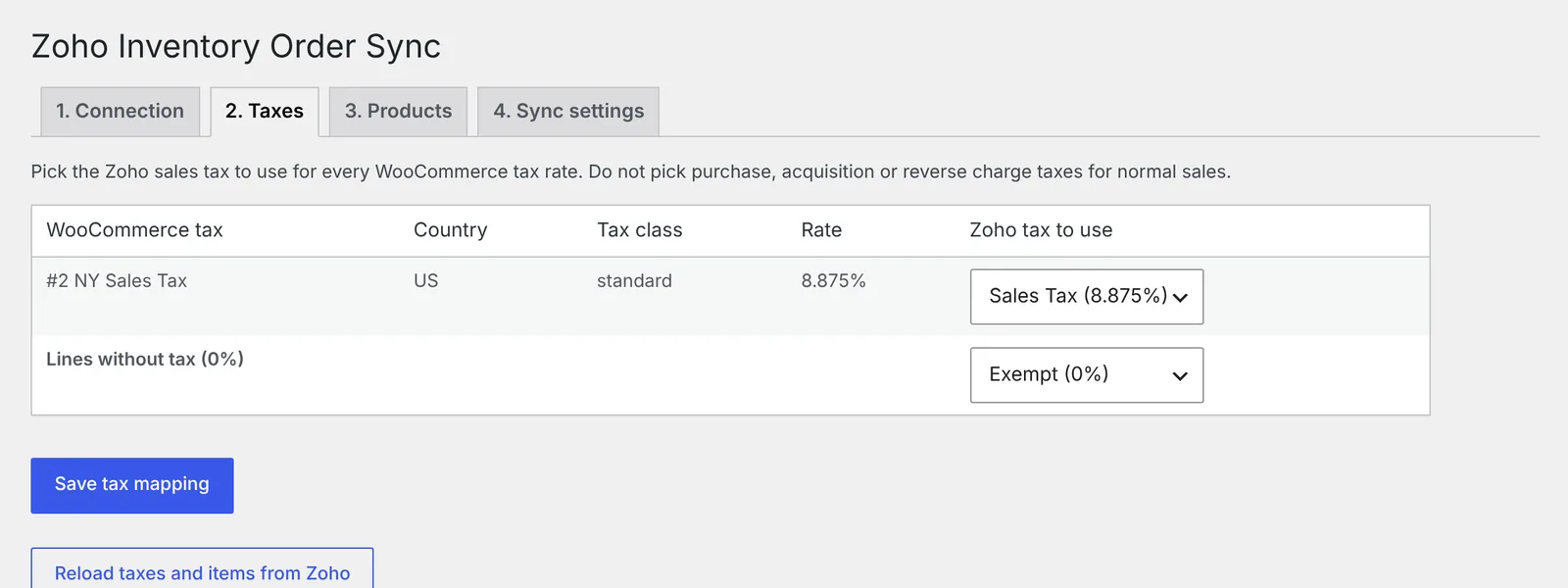
Map each WooCommerce tax rate to a specific Zoho tax, plus one for tax-exempt lines. Shipping and fees get the right tax too.
Products linked by SKU
Matching SKUs link automatically. Link the rest by hand, or paste a two-column list from a spreadsheet.
Customers created for you
Finds the Zoho customer by email, or creates one with billing and shipping addresses.
No duplicates
Before creating anything, the plugin checks Zoho for an existing record with the same reference and links it instead.
Clear status on every order
A "Zoho Inventory" box on each order shows what's synced and the last error. Full logs are in WooCommerce.
Swipe for more →
Everything lives inside WooCommerce.
After you activate the plugin, you'll find it in your WordPress dashboard. Here's exactly where each option appears.
The plugin's settings
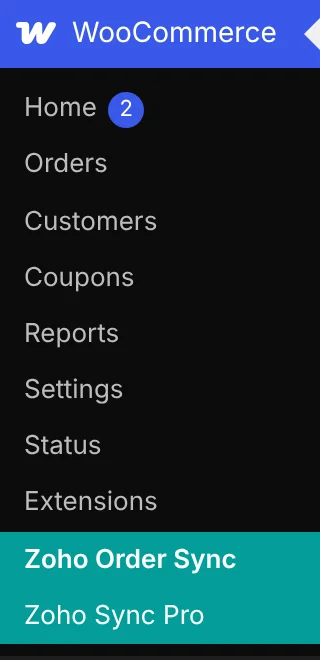
Two new items appear in the WooCommerce menu: Zoho Order Sync for all settings, and Zoho Sync Pro to activate your license if you buy a plan.
Sync status on every order
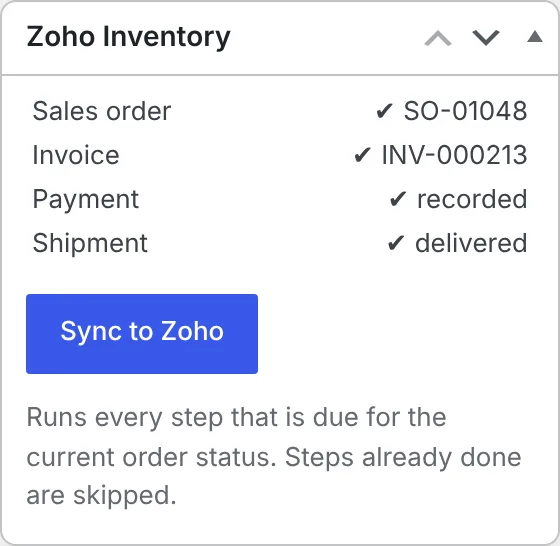
Open any order to see its sales order, invoice, payment and shipment status, plus a Sync to Zoho button.
Four simple tabs
1. Connection to your Zoho organization, 2. Taxes to map each tax rate, 3. Products to link SKUs, and 4. Sync settings for automatic sync. Pro options (invoice, payment, shipment) appear on the Sync settings tab.
Choose when each step runs
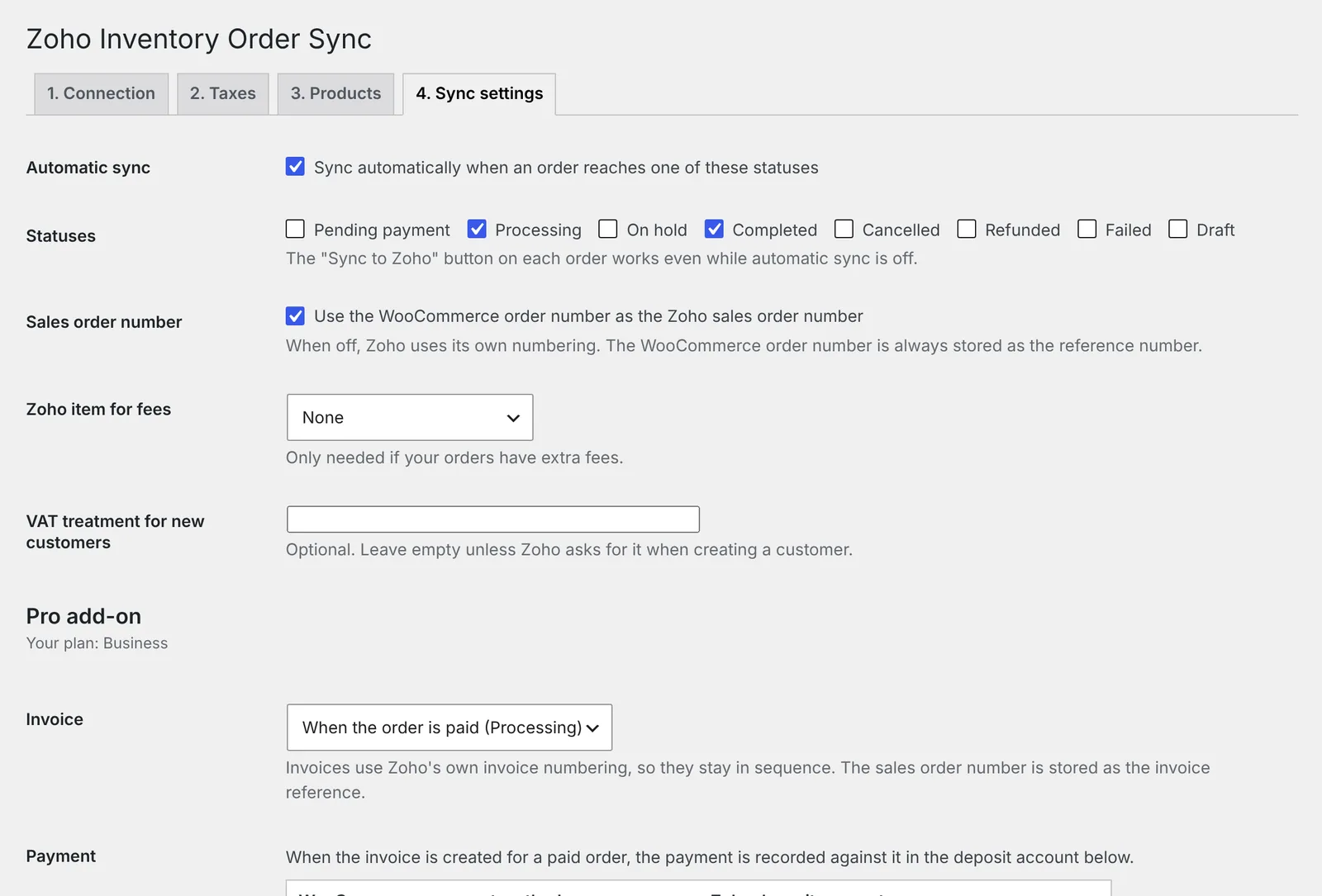
Pick the order statuses that trigger a sync, and with Pro, when invoices, payments and shipments are created.
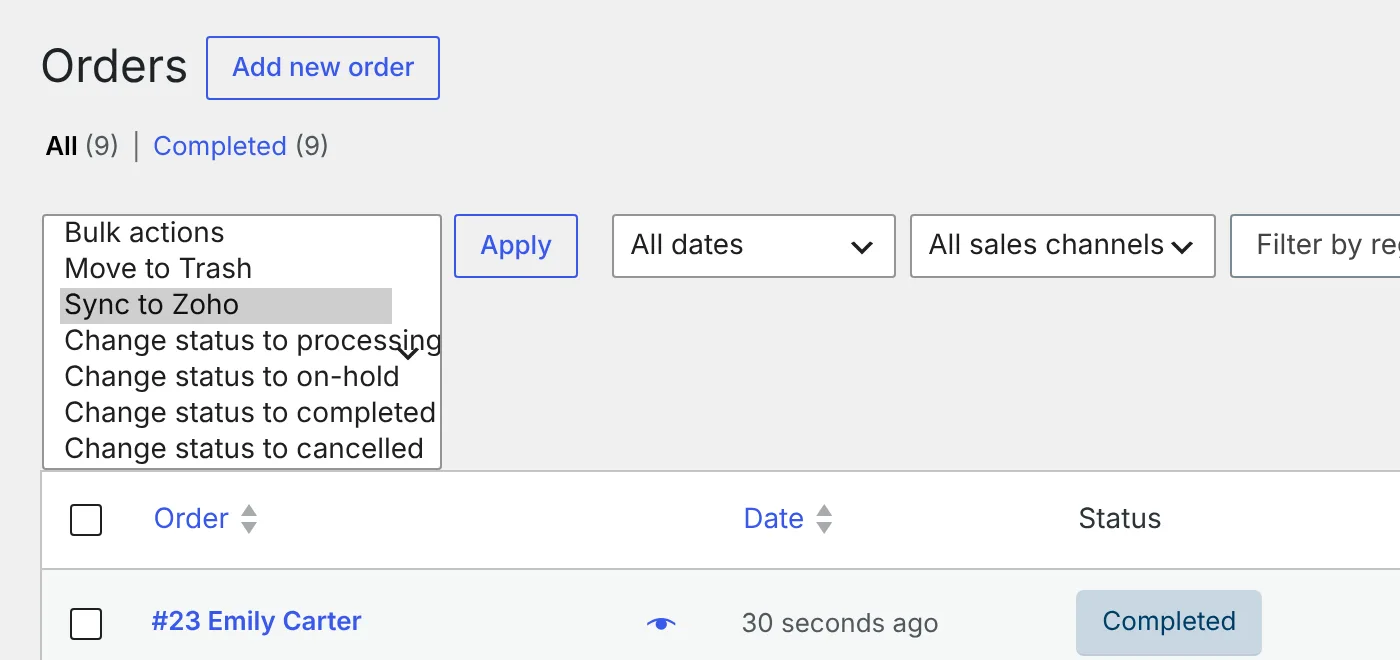
Sync many orders at once
On the Business plan, select orders in the list and choose Sync to Zoho from Bulk actions.
Swipe to see each screen →
Works with the rest of your Zoho apps.
The plugin sends orders to Zoho Inventory. Zoho's own integrations then share that data with Zoho Books and Zoho CRM, so you don't need a separate WooCommerce plugin for each app.
Zoho Inventory
Sales orders, invoices, payments, packages and shipments are created straight in your Zoho Inventory organization.
Zoho Books
If Zoho Inventory is connected to Zoho Books, the sales orders, invoices, payments and customers this plugin creates also appear in Zoho Books, ready for accounting.
Zoho CRM
With Zoho's Inventory and CRM integration, customers sync to Zoho CRM and you can view Inventory orders and invoices from CRM. Need leads or deals from WooCommerce in Zoho CRM? We build that.
Start free. Upgrade when you need more.
The free plugin automates sales orders. Paid plans add the steps after it. Each license covers one store.
Free
Automated sales orders with the right tax
- Sales orders in Zoho Inventory
- Exact tax mapping
- Products linked by SKU
- Customers, shipping charges and fees
- "Sync to Zoho" button
Starter
Add invoices
- Everything in Free
- Zoho invoice for each order
- Zoho's own invoice numbering
Pro
Add payments
- Everything in Starter
- Payment recorded on the invoice
- Deposit account per payment method
Business
Full order-to-shipment automation
- Everything in Pro
- Packages and delivered shipments
- Bulk "Sync to Zoho" from the orders list
Swipe to compare plans →
Up and running in about ten minutes.
Install
In WordPress go to Plugins → Add New, install and activate. WooCommerce must be active.
Connect Zoho
Open WooCommerce → Zoho Order Sync and follow the Connection tab to link your Zoho organization.
Map taxes & products
Pick the Zoho tax for each tax rate, then check your products are linked by SKU.
Turn on sync
On Sync settings, choose the statuses that trigger a sync. Done, new orders flow into Zoho.
WooCommerce and Zoho questions, answered.
What does the WooCommerce Zoho Inventory plugin do?
It sends every WooCommerce order to Zoho Inventory as a sales order, with the customer, products, shipping charges, fees and the exact Zoho tax you mapped. Paid plans also create the Zoho invoice, record the payment, and create the package and delivered shipment.
How do I integrate WooCommerce with Zoho Inventory?
Install the plugin in WordPress, open WooCommerce → Zoho Order Sync, connect your Zoho organization on the Connection tab, map each WooCommerce tax rate to a Zoho tax, check products are linked by SKU, then choose which order statuses trigger a sync. Most stores are set up in about ten minutes.
Is there a free Zoho WooCommerce plugin?
Yes. The free version creates Zoho Inventory sales orders with exact tax mapping, customers, shipping charges and fees, and has a “Sync to Zoho” button on every order. It is being listed on WordPress.org. Until then, message us and we will send it to you.
How much does it cost?
The free version costs nothing. Starter (invoices) is $3/month or $30/year, Pro (invoices and payments) is $5/month or $50/year, and Business (invoices, payments, packages, shipments and bulk sync) is $10/month or $100/year. Each license covers one store, and every plan has a 14-day money-back guarantee.
Does it work with Zoho Books?
Yes, through Zoho Inventory. The plugin creates records in Zoho Inventory, and when your Zoho Inventory organization is connected to Zoho Books, the sales orders, invoices, payments and customers sync to Zoho Books automatically. If you use Zoho Books without Zoho Inventory, contact us for a custom WooCommerce to Zoho Books integration.
Does it work with Zoho CRM?
Not directly. With Zoho’s built-in Zoho Inventory and Zoho CRM integration, customers sync to Zoho CRM and you can view Inventory sales orders and invoices from CRM. If you want WooCommerce customers, leads or deals sent straight to Zoho CRM, we build that as a custom integration.
Will it create duplicate records in Zoho?
No. Before creating a sales order it looks for one with the WooCommerce order number as the reference and links it if found. Invoices, payments and shipments are checked the same way.
Which invoice numbers are used?
Invoices use Zoho’s own numbering, so they stay in sequence. Sales orders can use the WooCommerce order number or Zoho’s numbering, as you prefer.
Does it sync products or stock levels?
No. It automates orders only (sales orders, invoices, payments and shipments), so it works alongside whatever you use for products and stock. Products are matched to Zoho items by SKU.
Which Zoho data centers are supported?
All of them: zoho.com (US and global), zoho.eu, zoho.in, zoho.com.au, zoho.jp, zohocloud.ca and zoho.sa.
Does it work with WooCommerce HPOS?
Yes. It supports High-Performance Order Storage and classic order storage, on WooCommerce 8.0 or newer with WordPress 6.5 and PHP 7.4 or newer.
How do I get the paid features after buying?
You receive an email with your license key and a download link. In WordPress, upload it under Plugins → Add New → Upload Plugin and activate it. The paid version includes everything in the free one, so it switches the free plugin off and keeps your Zoho connection and settings. Enter your key when asked and your plan’s options appear on the Sync settings tab.
What if it doesn’t work for my store?
Message us on WhatsApp and we will help. If we can’t fix a problem that makes the plugin unusable, you get a full refund within 14 days of purchase.
Can you set it up for me?
Yes. We can install, connect, map and test everything with you. Contact us or chat on WhatsApp.
We build custom syncs for any CRM.
This plugin connects WooCommerce to Zoho Inventory. If you need orders, leads or customers flowing into another system, we'll build the integration for you.